Shift Attendance Update
The Shift Attendance Update feature provides a comprehensive calendar-based interface for viewing and managing employee attendance across different shift schedules. This system displays real-time attendance data, shift timings, and allows administrators to send reminders and update attendance records as needed.
Feature Overview
The Shift Attendance Update system delivers comprehensive shift management functionality, enabling administrators to:
- Calendar-Based View: Visual representation of employee attendance across monthly periods
- Shift Schedule Display: Clear visibility of shift timings and work schedules
- Attendance Status Tracking: Real-time status updates for each employee
- Reminder System: Send automated reminders for attendance compliance
- Advanced Filtering: Filter employees by various criteria for targeted management
- Bulk Operations: Select multiple employees for batch processing
Calendar Interface
Monthly Attendance Grid
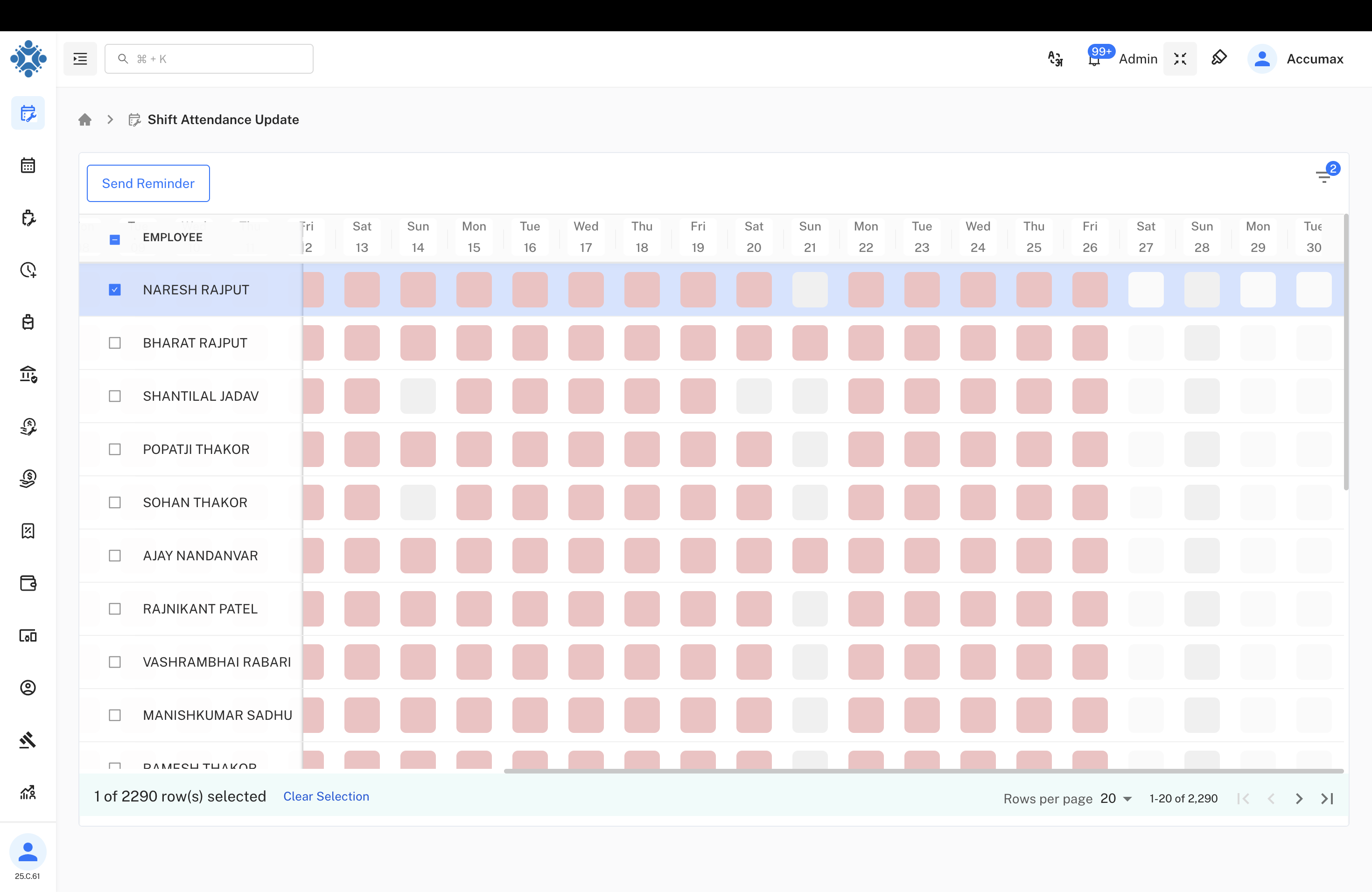
Visual Attendance Tracking:
- Monthly Overview: Complete month view from 15th to 30th with daily attendance status
- Color-Coded Status: Different colors represent various attendance states
- Employee List: Left sidebar showing all employees with selection checkboxes
- Date Navigation: Easy navigation through different months and dates
- Send Reminder: Quick action button for sending attendance reminders
Attendance Summary Modal
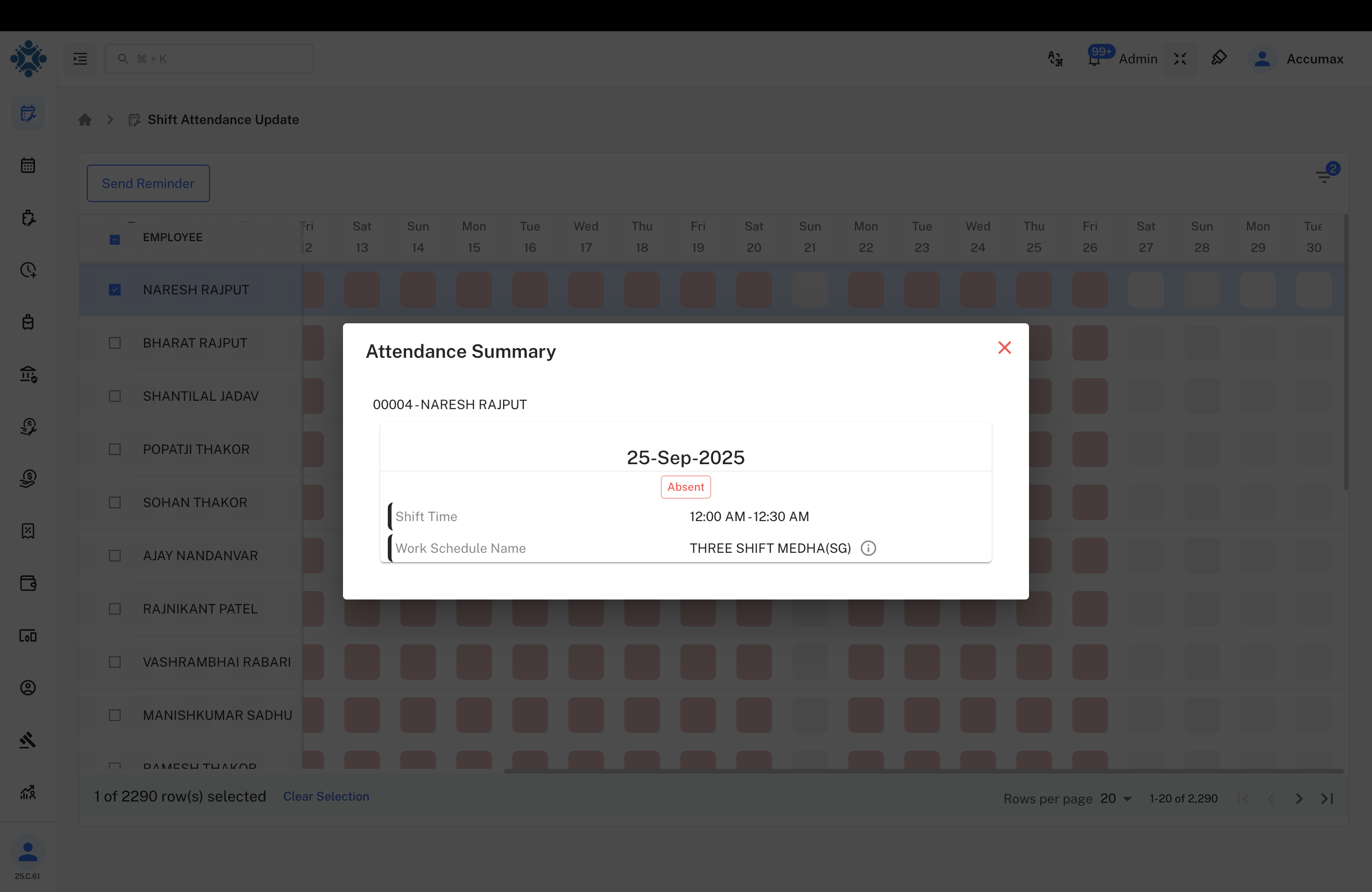
Summary Features:
Employee Information:
- Employee ID: 00004-NARESH RAJPUT
- Date: 25-Sep-2025
- Attendance Status: Absent (highlighted in red)
Shift Details:
- Shift Time: 12:00 AM-12:30 AM
- Work Schedule Name: THREE SHIFT MEDHA(SO)
- Schedule Information: Complete shift timing and schedule details
Interface Controls:
- Close Modal: Easy dismissal of detailed view
- Clear Information Display: Structured presentation of attendance data
Employee Management
Employee Selection Interface
Employee Roster:
Listed Employees:
- NARESH RAJPUT: Selected for attendance review
- BHARAT RAJPUT: Available for selection
- SHANTILAL JADAV: Team member attendance tracking
- POPATJI THAKOR: Individual attendance monitoring
- SOHAN THAKOR: Shift schedule management
- AJAY NANDANVAR: Senior level attendance oversight
- RAJNIKANT PATEL: Regular attendance tracking
- VASHRAMBHAI RABARI: Shift compliance monitoring
- MANISHKUMAR SADHU: Attendance pattern analysis
Management Features:
- Checkbox Selection: Individual employee selection for targeted actions
- Bulk Selection: "1 of 2290 row(s) selected" indicates large workforce management
- Clear Selection: Option to reset all selections
- Pagination: "Rows per page: 50" for efficient data handling :::### Attendance Summary Modal
Summary Features:
Employee Information:
- Employee ID: 00004-NARESH RAJPUT
- Date: 25-Sep-2025
- Attendance Status: Absent (highlighted in red)
Shift Details:
- Shift Time: 12:00 AM-12:30 AM
- Work Schedule Name: THREE SHIFT MEDHA(SO)
- Schedule Information: Complete shift timing and schedule details
Interface Controls:
- Close Modal: Easy dismissal of detailed view
- Clear Information Display: Structured presentation of attendance data
Employee Management
Employee Selection Interface
Employee Roster:
Listed Employees:
- NARESH RAJPUT: Selected for attendance review
- BHARAT RAJPUT: Available for selection
- SHANTILAL JADAV: Team member attendance tracking
- POPATJI THAKOR: Individual attendance monitoring
- SOHAN THAKOR: Shift schedule management
- AJAY NANDANVAR: Senior level attendance oversight
- RAJNIKANT PATEL: Regular attendance tracking
- VASHRAMBHAI RABARI: Shift compliance monitoring
- MANISHKUMAR SADHU: Attendance pattern analysis
Management Features:
- Checkbox Selection: Individual employee selection for targeted actions
- Bulk Selection: "1 of 2290 row(s) selected" indicates large workforce management
- Clear Selection: Option to reset all selections
- Pagination: "Rows per page: 50" for efficient data handling
Advanced Filtering System
Comprehensive Filter Options
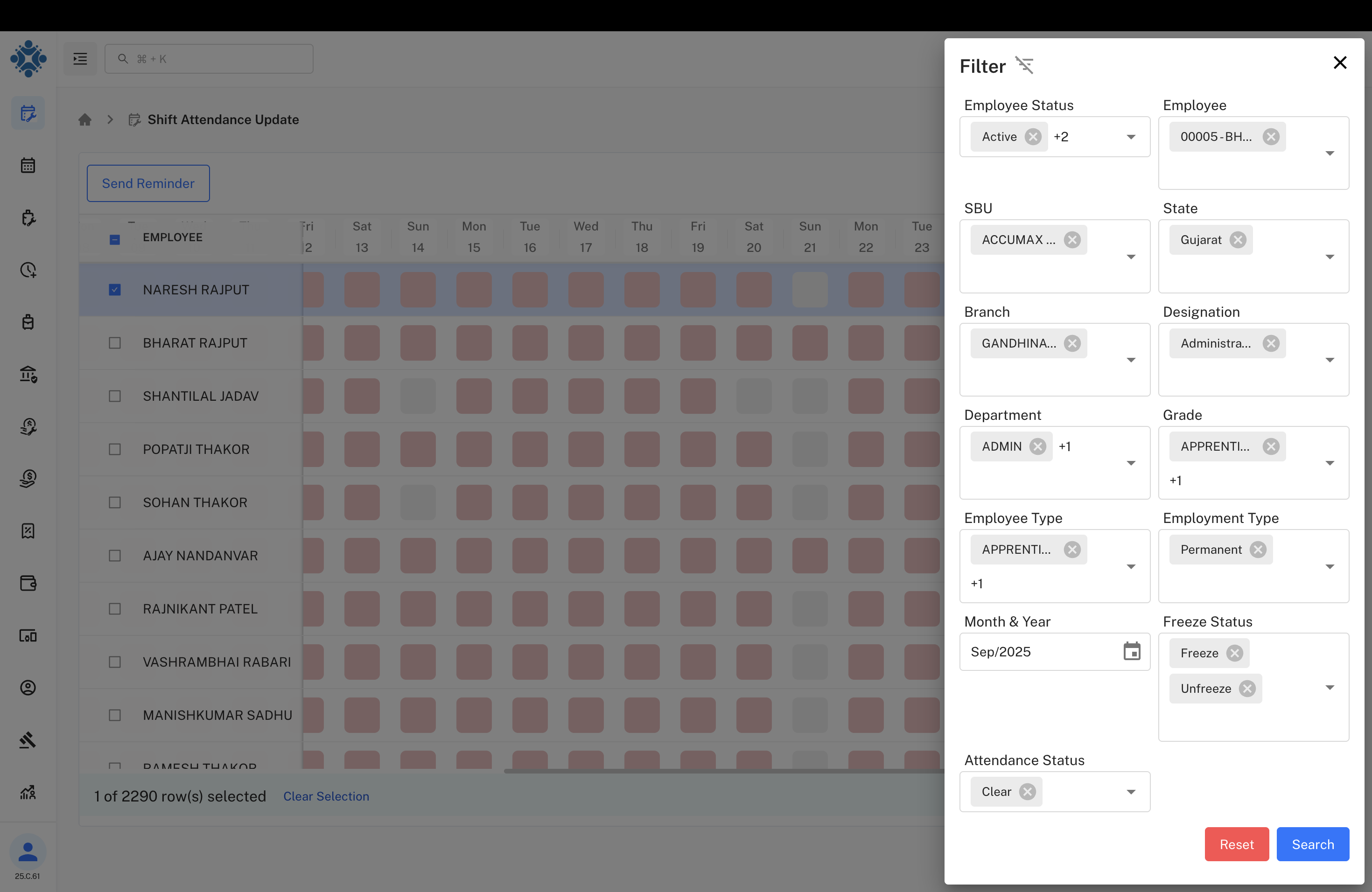
Available Filter Options:
Employee Information:
- Employee Status: Active employees (+2 additional status options)
- Employee: 00005-BH... (specific employee selection)
- SBU: ACCUMAX (Strategic Business Unit filtering)
- State: Gujarat (geographic filtering)
Organizational Structure:
- Branch: GANDHINA... (branch-based filtering)
- Designation: Administra... (role-based filtering)
- Department: ADMIN (+1 additional department)
- Grade: APPRENTI... (+1 additional grade level)
Employment Details:
- Employee Type: APPRENTI... (+1 additional type)
- Employment Type: Permanent (contract classification)
Time and Status Filters:
- Month & Year: Sep/2025 (time period selection)
- Freeze Status: Freeze/Unfreeze options
- Attendance Status: Clear (attendance state filtering)
Filter Actions:
- Reset: Clear all applied filters
- Search: Apply selected filter criteria
Attendance Status Management
Status Indicators
Attendance Status Types:
- Present: Normal attendance marked (indicated by filled cells)
- Absent: Missing attendance (highlighted in red)
- Partial Day: Incomplete attendance periods
- Holiday: Scheduled non-working days
- Leave: Approved time off periods
- Late Coming: Tardiness indicators
- Early Going: Early departure tracking
Shift Schedule Information
Schedule Components:
- Shift Names: THREE SHIFT MEDHA(SO) - organized shift patterns
- Time Ranges: 12:00 AM-12:30 AM - specific shift timing windows
- Schedule Codes: Systematic identification of different shift patterns
- Work Patterns: Rotating or fixed shift assignments
System Functionality
Send Reminder Feature
Reminder Capabilities:
- Targeted Reminders: Send to specific employees or groups
- Attendance Alerts: Notify about missing or incomplete attendance
- Schedule Notifications: Remind about upcoming shift changes
- Compliance Messages: Automated policy adherence reminders
- Bulk Messaging: Send reminders to multiple employees simultaneously
Data Management
System Operations:
- Real-time Updates: Immediate reflection of attendance changes
- Bulk Selection: "1 of 2290 row(s) selected" - large-scale operations
- Pagination Control: "Rows per page: 50" - efficient data display
- Data Filtering: Advanced search and filter capabilities
- Export Functions: Generate reports and data exports
Interface Components
Calendar Navigation
| Feature | Functionality | Benefits |
|---|---|---|
| Monthly View | Display full month attendance grid | Complete visibility of attendance patterns |
| Date Selection | Click on specific dates for details | Quick access to daily attendance information |
| Employee Rows | Individual employee attendance tracking | Personalized attendance monitoring |
| Color Coding | Visual status representation | Immediate recognition of attendance states |
Employee Information Display
Data Presentation:
- Employee ID Format: 00004-NARESH RAJPUT (standardized identification)
- Hierarchical Display: Organized employee listing with clear structure
- Status Integration: Attendance status embedded with employee information
- Quick Access: Immediate visibility of key employee details
Operational Workflows
Daily Attendance Review
Review Steps:
- Access Calendar: Open monthly attendance calendar view
- Select Date: Click on specific date for detailed review
- Review Status: Check employee attendance status and patterns
- Send Reminders: Use reminder system for follow-up actions
- Update Records: Make necessary attendance corrections
- Document Changes: Maintain audit trail of modifications
Shift Management Process
Management Steps:
- Filter Employees: Use advanced filters to target specific groups
- Review Schedules: Check shift assignments and timings
- Monitor Compliance: Track adherence to shift schedules
- Update Shifts: Modify shift assignments as needed
- Communicate Changes: Send notifications about schedule updates
Technical Specifications
System Performance
System Capabilities:
- Data Volume: Handles 2290+ employee records efficiently
- Real-time Processing: Immediate attendance status updates
- Concurrent Users: Multi-user access with data consistency
- Response Time: Sub-second query and filter responses
- Scalability: Support for growing workforce requirements
Integration Features
Integration Points:
- Punch Machine Sync: Real-time data from attendance devices
- Payroll Integration: Attendance data for salary processing
- HR Systems: Employee information synchronization
- Reporting Tools: Data export for analytics and compliance
- Mobile Access: Mobile-responsive interface for remote management
Benefits and Impact Analysis
Management Advantages
- Visual Clarity: Calendar-based interface provides immediate pattern recognition
- Efficient Navigation: Quick access to specific dates and employee records
- Bulk Operations: Handle multiple employees simultaneously for efficiency
- Real-time Monitoring: Immediate visibility into attendance compliance
- Flexible Filtering: Target specific employee groups for focused management
Operational Benefits
- Reduced Processing Time: 80% faster attendance review and updates
- Improved Accuracy: Visual interface reduces data entry errors
- Enhanced Compliance: Better tracking of shift schedule adherence
- Streamlined Communication: Integrated reminder system for follow-ups
- Comprehensive Reporting: Complete attendance data for decision-making
Employee Experience
- Transparency: Clear visibility of attendance records and expectations
- Schedule Clarity: Easy access to shift timing and schedule information
- Timely Reminders: Proactive notifications about attendance requirements
- Fair Treatment: Consistent attendance tracking across all employees
- Quick Resolution: Fast processing of attendance updates and corrections
Best Practices and Guidelines
Attendance Monitoring
Daily Operations:
- Regular Reviews: Daily check of attendance status across all shifts
- Pattern Analysis: Weekly review of attendance trends and issues
- Proactive Communication: Send reminders before attendance problems escalate
- Schedule Compliance: Monitor adherence to assigned shift timings
- Data Accuracy: Regular validation of attendance data with punch records
System Optimization
Performance Enhancement:
- Filter Usage: Utilize filters to focus on specific employee groups
- Batch Processing: Group similar operations for efficiency
- Regular Maintenance: Keep employee and shift data updated
- Training: Ensure users understand all system capabilities
- Feedback Collection: Gather user input for system improvements
Troubleshooting and Support
Common Issues and Solutions
| Issue | Cause | Solution |
|---|---|---|
| Calendar Not Loading | Data connectivity problems | Refresh page and check network connection |
| Missing Employee Data | Database synchronization delay | Run manual sync or wait for automatic update |
| Filter Not Working | Cache or browser issues | Clear browser cache and reload application |
| Reminder Not Sent | Email configuration problems | Verify email settings and recipient addresses |
Support Resources
- User Guides: Comprehensive documentation for all features
- Video Tutorials: Step-by-step visual guidance for system use
- Help Desk: Technical support for system issues and questions
- Training Programs: Regular education about new features and best practices
- Community Forum: User community for sharing tips and solutions
Last Updated: September 26, 2025
Document Version: 1.0
Prepared for: Emgage HRMS Implementation Team
System Module: Shift Attendance Update and Management