Attendance Email Notification Setup
The Attendance Email Notification Setup allows administrators to configure automated email alerts for various attendance scenarios. This comprehensive system ensures timely communication about attendance issues, policy violations, and schedule deviations to relevant stakeholders.
System Overview
The Email Notification Setup provides proactive attendance monitoring, enabling organizations to:
- Automated Alerts: Set up automatic email notifications for attendance violations
- Multi-scenario Coverage: Configure notifications for different attendance scenarios
- Flexible Recipients: Send notifications to employees, managers, or administrators
- Customizable Frequency: Choose daily, weekly, or monthly notification schedules
- Targeted Communication: Specific notifications based on attendance patterns
Notification Categories
The system provides five distinct notification categories, each addressing specific attendance monitoring needs:
1. Working Hour Shortfall
Monitor and alert when employees don't meet required working hour thresholds.
Use Cases:
- Employees not completing minimum daily working hours
- Tracking part-time vs full-time hour requirements
- Identifying patterns of insufficient work time
- Compliance with labor hour regulations
2. Flexible Schedule Shortfall
Track deviations from flexible working schedule arrangements.
Use Cases:
- Employees not meeting flexible schedule commitments
- Monitoring remote work hour compliance
- Tracking hybrid work schedule adherence
- Managing flexible time arrangements
3. Late Coming-Early Going
Alert for tardiness and early departure patterns.
Use Cases:
- Frequent late arrivals or early departures
- Pattern analysis for attendance behavior
- Policy violation tracking
- Performance impact assessment
4. Penalty Warning
Issue automated warnings for attendance policy violations.
Use Cases:
- Progressive disciplinary notifications
- Attendance policy violation alerts
- Warning system for repeated infractions
- Documentation for HR actions
5. Missing In/Out Punch
Monitor incomplete attendance records from punch machines.
Use Cases:
- Missing punch-in or punch-out records
- Incomplete attendance data alerts
- System malfunction notifications
- Data integrity monitoring
Configuration Interface
Notification Setup Tabs
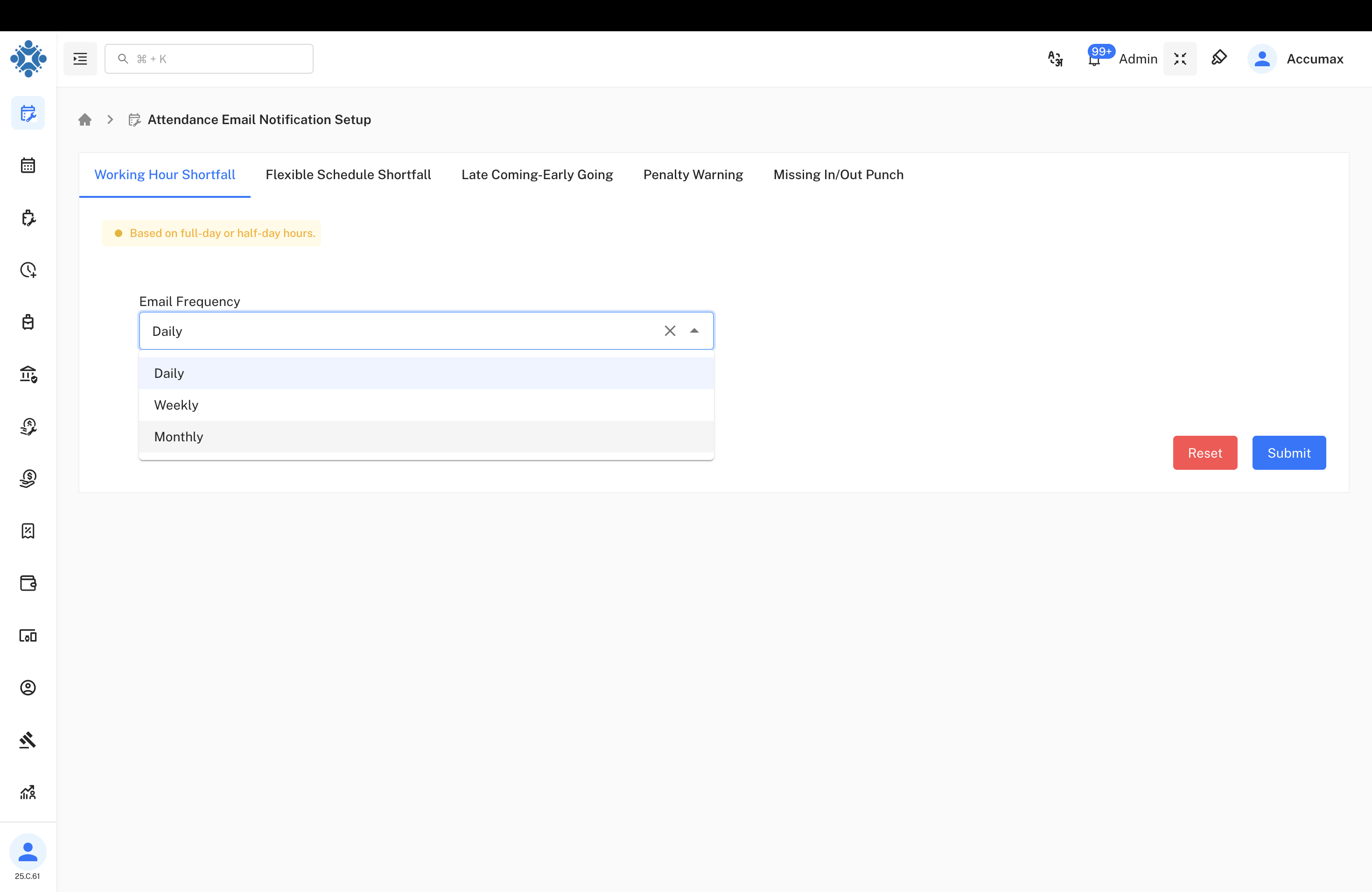
Tab Structure:
- Working Hour Shortfall: Configure minimum hour requirement alerts
- Flexible Schedule Shortfall: Set up flexible work arrangement monitoring
- Late Coming-Early Going: Configure punctuality violation notifications
- Penalty Warning: Set up disciplinary alert system
- Missing In/Out Punch: Configure punch record completion alerts
Email Frequency Configuration
Frequency Options
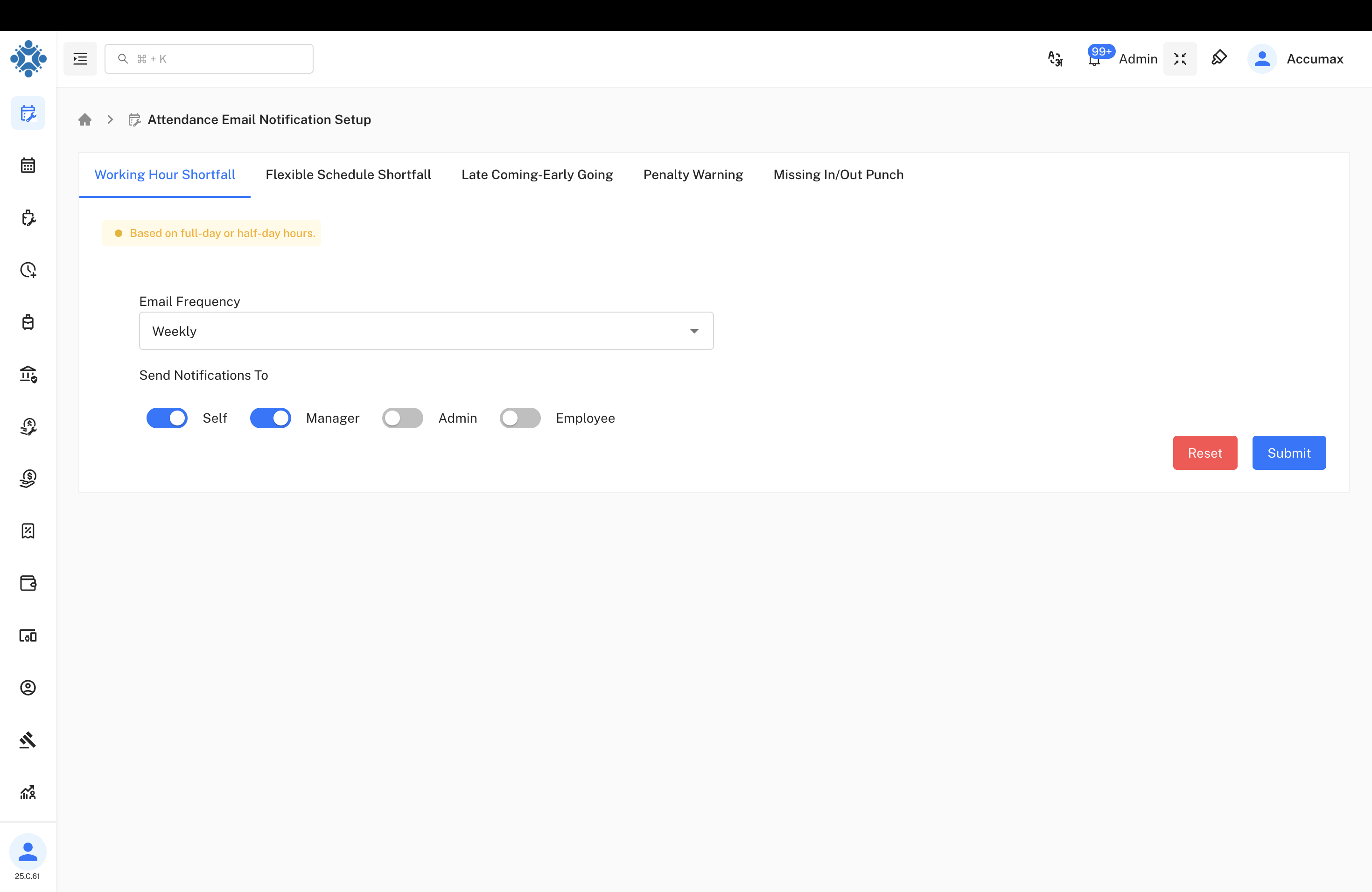
Available Options:
- Daily: Send notifications every day based on daily attendance data
- Weekly: Compile weekly attendance summary notifications
- Monthly: Generate monthly attendance report notifications
Configuration Features:
- Dropdown selection for easy frequency choice
- Real-time preview of notification timing
- Flexible scheduling based on organizational needs
Notification Timing
Daily Notifications:
- Immediate alerts for same-day violations
- Real-time attendance monitoring
- Quick response to attendance issues
Weekly Notifications:
- Summarized attendance patterns
- Trend analysis over weekly periods
- Reduced email volume with comprehensive data
Monthly Notifications:
- Comprehensive attendance reports
- Long-term pattern identification
- Performance review support data
Recipient Configuration
Send Notifications To
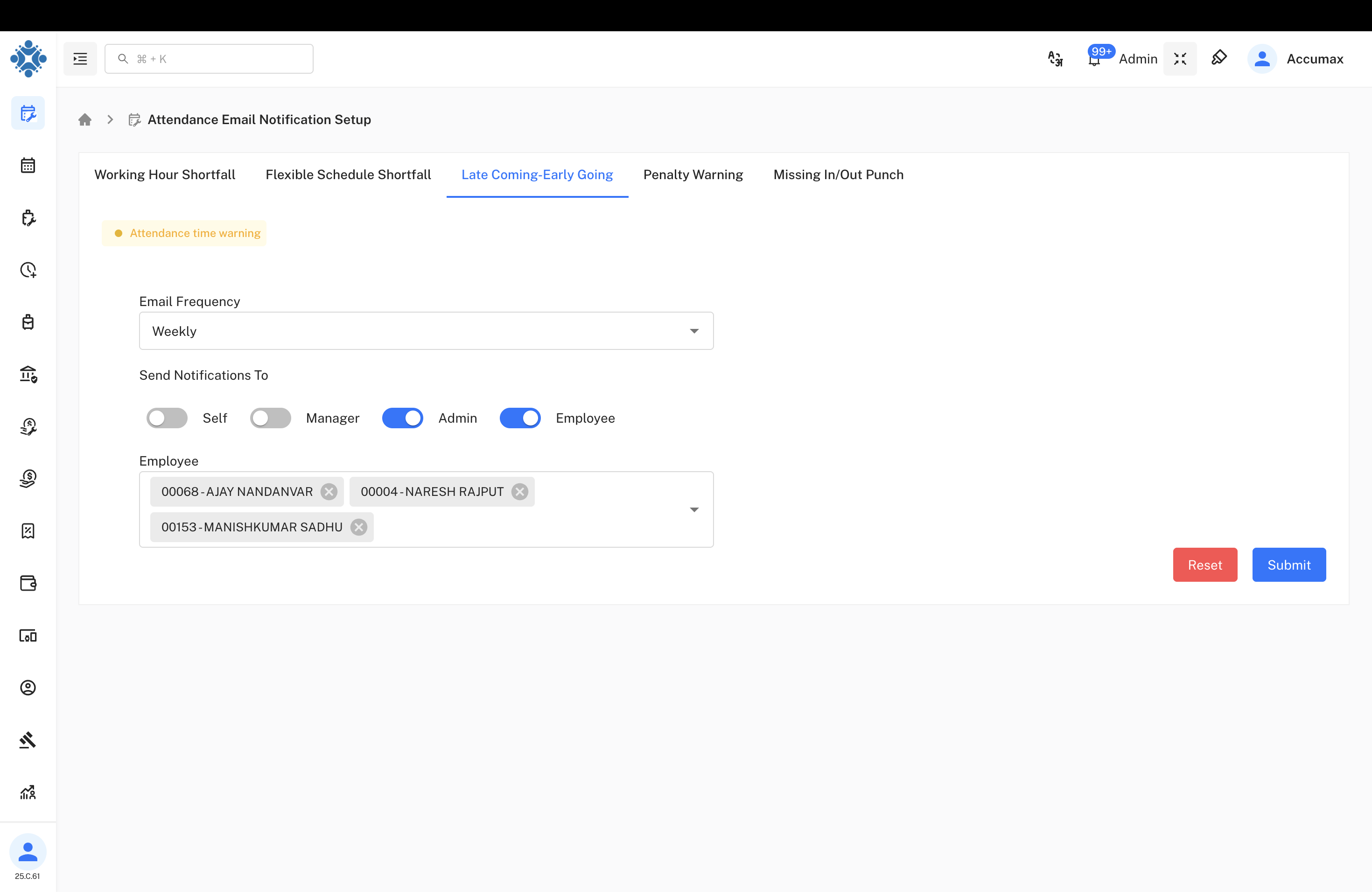
Available Recipients:
- Self: Employee receives their own attendance notifications
- Manager: Direct supervisor receives team attendance alerts
- Admin: System administrators receive organizational alerts
- Employee: Specific employees can be selected for notifications
Selection Features:
- Toggle switches for easy on/off control
- Multiple recipient selection capability
- Role-based notification routing
- Flexible recipient combinations
Advanced Email Configuration
Frequency Options
Attendance Email Notification Setup
The Attendance Email Notification Setup allows administrators to configure automated email alerts for various attendance scenarios. This comprehensive system ensures timely communication about attendance issues, policy violations, and schedule deviations to relevant stakeholders.
System Overview
The Email Notification Setup provides proactive attendance monitoring, enabling organizations to:
- Automated Alerts: Set up automatic email notifications for attendance violations
- Multi-scenario Coverage: Configure notifications for different attendance scenarios
- Flexible Recipients: Send notifications to employees, managers, or administrators
- Customizable Frequency: Choose daily, weekly, or monthly notification schedules
- Targeted Communication: Specific notifications based on attendance patterns
Notification Categories
The system provides five distinct notification categories, each addressing specific attendance monitoring needs:
1. Working Hour Shortfall
Monitor and alert when employees don't meet required working hour thresholds.
Use Cases:
- Employees not completing minimum daily working hours
- Tracking part-time vs full-time hour requirements
- Identifying patterns of insufficient work time
- Compliance with labor hour regulations
2. Flexible Schedule Shortfall
Track deviations from flexible working schedule arrangements.
Use Cases:
- Employees not meeting flexible schedule commitments
- Monitoring remote work hour compliance
- Tracking hybrid work schedule adherence
- Managing flexible time arrangements
3. Late Coming-Early Going
Alert for tardiness and early departure patterns.
Use Cases:
- Frequent late arrivals or early departures
- Pattern analysis for attendance behavior
- Policy violation tracking
- Performance impact assessment
4. Penalty Warning
Issue automated warnings for attendance policy violations.
Use Cases:
- Progressive disciplinary notifications
- Attendance policy violation alerts
- Warning system for repeated infractions
- Documentation for HR actions
5. Missing In/Out Punch
Monitor incomplete attendance records from punch machines.
Use Cases:
- Missing punch-in or punch-out records
- Incomplete attendance data alerts
- System malfunction notifications
- Data integrity monitoring
Configuration Interface
Notification Setup Tabs
Tab Structure:
- Working Hour Shortfall: Configure minimum hour requirement alerts
- Flexible Schedule Shortfall: Set up flexible work arrangement monitoring
- Late Coming-Early Going: Configure punctuality violation notifications
- Penalty Warning: Set up disciplinary alert system
- Missing In/Out Punch: Configure punch record completion alerts
Email Frequency Configuration
Frequency Options
Available Options:
- Daily: Send notifications every day based on daily attendance data
- Weekly: Compile weekly attendance summary notifications
- Monthly: Generate monthly attendance report notifications
Configuration Features:
- Dropdown selection for easy frequency choice
- Real-time preview of notification timing
- Flexible scheduling based on organizational needs
Notification Timing
Daily Notifications:
- Immediate alerts for same-day violations
- Real-time attendance monitoring
- Quick response to attendance issues
Weekly Notifications:
- Summarized attendance patterns
- Trend analysis over weekly periods
- Reduced email volume with comprehensive data
Monthly Notifications:
- Comprehensive attendance reports
- Long-term pattern identification
- Performance review support data
Recipient Configuration
Send Notifications To
Available Recipients:
- Self: Employee receives their own attendance notifications
- Manager: Direct supervisor receives team attendance alerts
- Admin: System administrators receive organizational alerts
- Employee: Specific employees can be selected for notifications
Selection Features:
- Toggle switches for easy on/off control
- Multiple recipient selection capability
- Role-based notification routing
- Flexible recipient combinations :::## Email Frequency Configuration
Frequency Options
Available Options:
- Daily: Send notifications every day based on daily attendance data
- Weekly: Compile weekly attendance summary notifications
- Monthly: Generate monthly attendance report notifications
Configuration Features:
- Dropdown selection for easy frequency choice
- Real-time preview of notification timing
- Flexible scheduling based on organizational needs
Notification Timing
Daily Notifications:
- Immediate alerts for same-day violations
- Real-time attendance monitoring
- Quick response to attendance issues
Weekly Notifications:
- Summarized attendance patterns
- Trend analysis over weekly periods
- Reduced email volume with comprehensive data
Monthly Notifications:
- Comprehensive attendance reports
- Long-term pattern identification
- Performance review support data
Recipient Configuration
Send Notifications To
Available Recipients:
- Self: Employee receives their own attendance notifications
- Manager: Direct supervisor receives team attendance alerts
- Admin: System administrators receive organizational alerts
- Employee: Specific employees can be selected for notifications
Selection Features:
- Toggle switches for easy on/off control
- Multiple recipient selection capability
- Role-based notification routing
- Flexible recipient combinations
Employee Selection
Selection Capabilities:
Featured Employees:
- 00068-AJAY NANDANVAR: Senior Manager level notifications
- 00004-NARESH RAJPUT: Shift Incharge level alerts
- 00153-MANISHKUMAR SADHU: Shift Incharge level notifications
Selection Features:
- Individual employee selection with employee ID
- Role-based filtering and selection
- Multiple employee selection capability
- Easy removal and modification options
Recipient Role Management
Recipient Roles:
- Self: Personal attendance notifications to individual employees
- Manager: Supervisory notifications for team management
- Admin: Administrative notifications for system oversight
- Employee: Custom employee group notifications
Configuration Benefits:
- Clear visual toggle controls
- Role hierarchy respect
- Flexible notification distribution
- Organizational structure alignment
Configuration Process
Step-by-Step Setup
Configuration Steps:
- Select Notification Category: Choose from the five available notification types
- Configure Email Frequency: Set daily, weekly, or monthly notification schedule
- Choose Recipients: Select who should receive the notifications
- Select Specific Employees: If needed, target specific individuals
- Save Configuration: Submit settings to activate notifications
Working Hour Shortfall Configuration
Configuration Features:
- Warning Message: "Based on full-day or half-day hours" indicator
- Frequency Selection: Weekly notification schedule option
- Recipient Setup: Self and Manager notification toggles activated
- Easy Controls: Reset and Submit buttons for configuration management
Use Case Example:
- Monitor employees not meeting daily 8-hour requirements
- Send weekly summaries to employees and their managers
- Automated alerts for pattern identification
Technical Implementation
Email Delivery System
Technical Components:
- SMTP Integration: Reliable email delivery through configured mail servers
- Template Engine: Customizable email templates for different notification types
- Scheduling System: Automated timing for different frequency options
- Recipient Management: Dynamic recipient list management and updates
- Audit Trail: Complete logging of all sent notifications
Data Processing
Data Handling:
- Real-time Processing: Immediate data analysis for daily notifications
- Batch Processing: Efficient bulk processing for weekly/monthly reports
- Data Validation: Ensure accuracy before sending notifications
- Performance Optimization: Efficient database queries and processing
- Error Handling: Robust error management and retry mechanisms
Notification Content Structure
Email Template Components
| Component | Description | Customizable |
|---|---|---|
| Subject Line | Clear indication of notification type and urgency | Yes |
| Employee Details | Name, ID, department, and role information | Auto-filled |
| Violation Summary | Specific attendance issue description | Dynamic |
| Time Period | Date range or specific incident timeframe | Auto-calculated |
| Action Required | Next steps or corrective measures needed | Configurable |
| Contact Information | HR or manager contact for follow-up | Customizable |
Sample Notification Scenarios
Working Hour Shortfall:
- "John Doe worked only 6.5 hours on [Date] - minimum 8 hours required"
- Weekly summary: "Total hours: 35/40 - 5 hours shortfall this week"
Late Coming-Early Going:
- "Arrived 30 minutes late at 9:30 AM on [Date]"
- "Left 45 minutes early at 4:15 PM on [Date]"
Missing Punch Records:
- "No punch-out recorded for [Date] - please verify attendance"
- "Missing punch-in data for morning shift on [Date]"
Benefits and Impact Analysis
Organizational Benefits
- 95% Reduction in manual attendance monitoring efforts
- Real-time Awareness of attendance issues across the organization
- Improved Compliance with labor regulations and company policies
- Data-Driven Decisions based on comprehensive attendance analytics
- Enhanced Communication between employees, managers, and HR
Management Advantages
- Proactive Management: Early identification of attendance patterns
- Automated Documentation: Comprehensive audit trail for HR actions
- Policy Enforcement: Consistent application of attendance policies
- Performance Insights: Correlation between attendance and productivity
- Reduced Administrative Burden: Automated notification and tracking
Employee Benefits
- Self-Awareness: Personal attendance pattern visibility
- Transparency: Clear communication about attendance expectations
- Timely Alerts: Immediate notification of attendance issues
- Improvement Opportunities: Data to help improve attendance habits
- Fair Treatment: Consistent policy application across all employees
Best Practices and Recommendations
Configuration Best Practices
- Start Simple: Begin with basic daily notifications before adding complexity
- Test Thoroughly: Use small groups to test notification accuracy and timing
- Regular Review: Monthly review of notification effectiveness and relevance
- Feedback Integration: Collect user feedback for continuous improvement
- Documentation: Maintain clear records of notification policies and procedures
Frequency Recommendations
Daily Notifications:
- Critical violations (missing punches, significant tardiness)
- Real-time alerts requiring immediate attention
- High-priority attendance issues
Weekly Notifications:
- Pattern analysis and trend identification
- Summary reports for management review
- Comprehensive team attendance overviews
Monthly Notifications:
- Performance review preparation
- Long-term trend analysis
- Compliance reporting and documentation
Troubleshooting and Support
Common Configuration Issues
| Issue | Cause | Solution |
|---|---|---|
| Notifications Not Sent | Incorrect email configuration | Verify SMTP settings and recipient addresses |
| Wrong Recipients | Incorrect role mapping | Review and update recipient selection |
| Timing Issues | Incorrect frequency setting | Adjust frequency and scheduling parameters |
| Missing Data | Database connectivity problems | Check database connections and data availability |
Support Resources
- Configuration Guides: Step-by-step setup documentation
- Video Tutorials: Visual guides for notification setup
- Help Desk Support: Technical assistance for configuration issues
- Best Practice Sharing: Community forums for sharing effective configurations
- Regular Training: Ongoing education about new features and capabilities
Last Updated: September 26, 2025
Document Version: 1.0
Prepared for: Emgage HRMS Implementation Team
System Module: Attendance Email Notification Configuration