Update Punch Time
The Update Punch Time feature provides comprehensive functionality for managing and updating employee punch in/out times with automatic total hours calculation. This system allows administrators to view, edit, and maintain accurate attendance records with flexible date filtering and bulk operations.
Feature Overview
The Update Punch Time system delivers precise time management functionality, enabling administrators to:
- Dual View Modes: Switch between Total Hours and Punch In/Out Time views
- Time Record Updates: Modify punch in and punch out times for accuracy
- Automatic Calculations: Real-time total hours computation based on punch times
- Date Range Filtering: Filter records by specific date periods
- Employee Management: Update multiple employees' time records efficiently
- Bulk Operations: Add and submit multiple time updates simultaneously
Interface Modes
Total Hours View
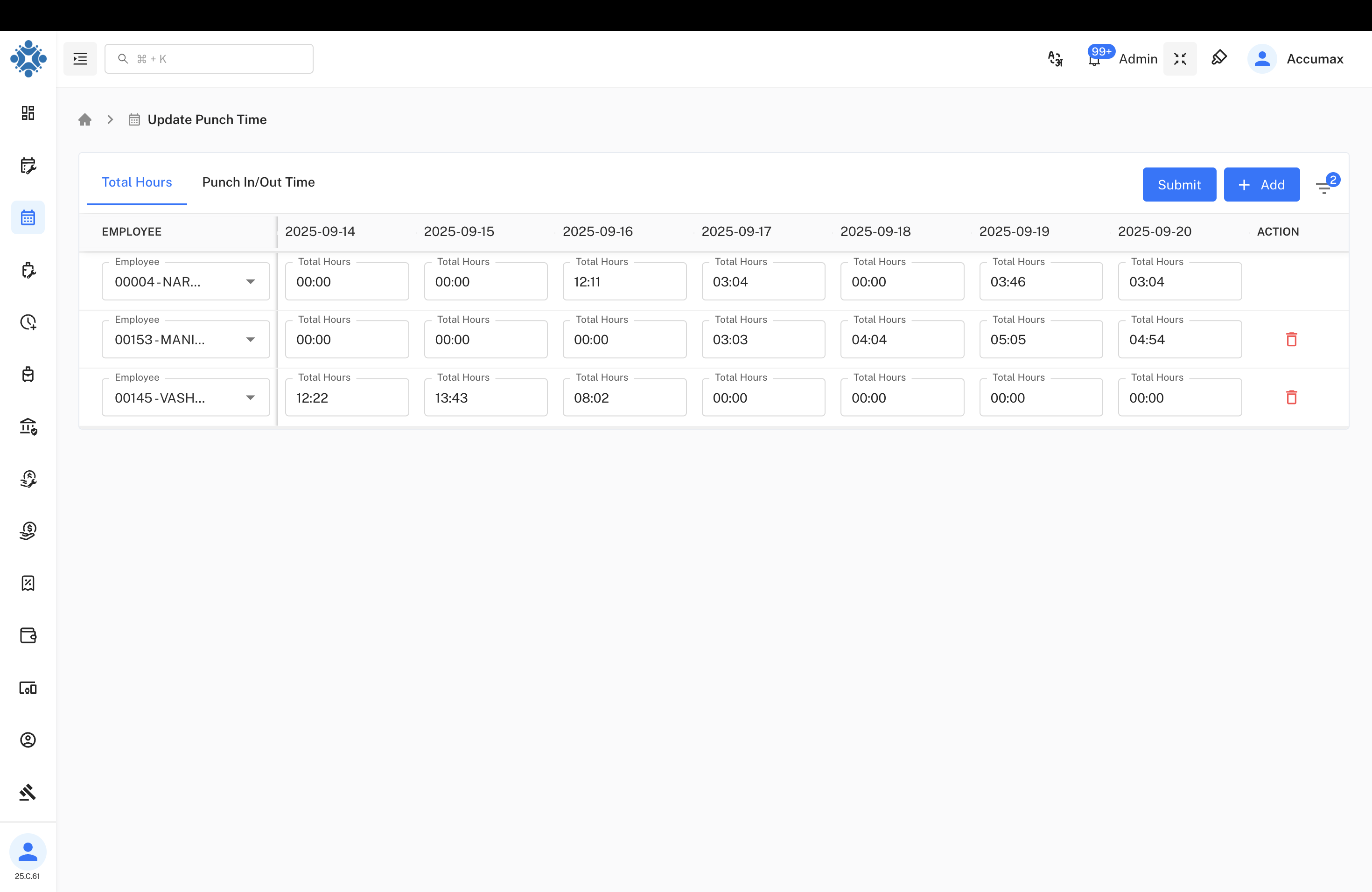
Overview Display:
Date Range Coverage:
- Week Period: 2025-09-14 to 2025-09-20
- Daily Columns: Individual date columns for easy tracking
- Action Column: Quick access to editing functions
Employee Records:
- 00004-NARESH RAJPUT: Total hours displayed across the week (00:00, 03:04, etc.)
- 00153-MANISHKUMAR SADHU: Daily hour tracking (00:00, 03:03, 04:04, 05:05, 04:54)
- 00145-VASHRAMBHAI RABARI: Work pattern analysis (12:22, 13:43, 08:02, 00:00 series)
Interface Controls:
- Submit Button: Apply all changes made to time records
- Add Button: Create new time entries
- Employee Dropdown: Select specific employees for updates
Punch In/Out Time View
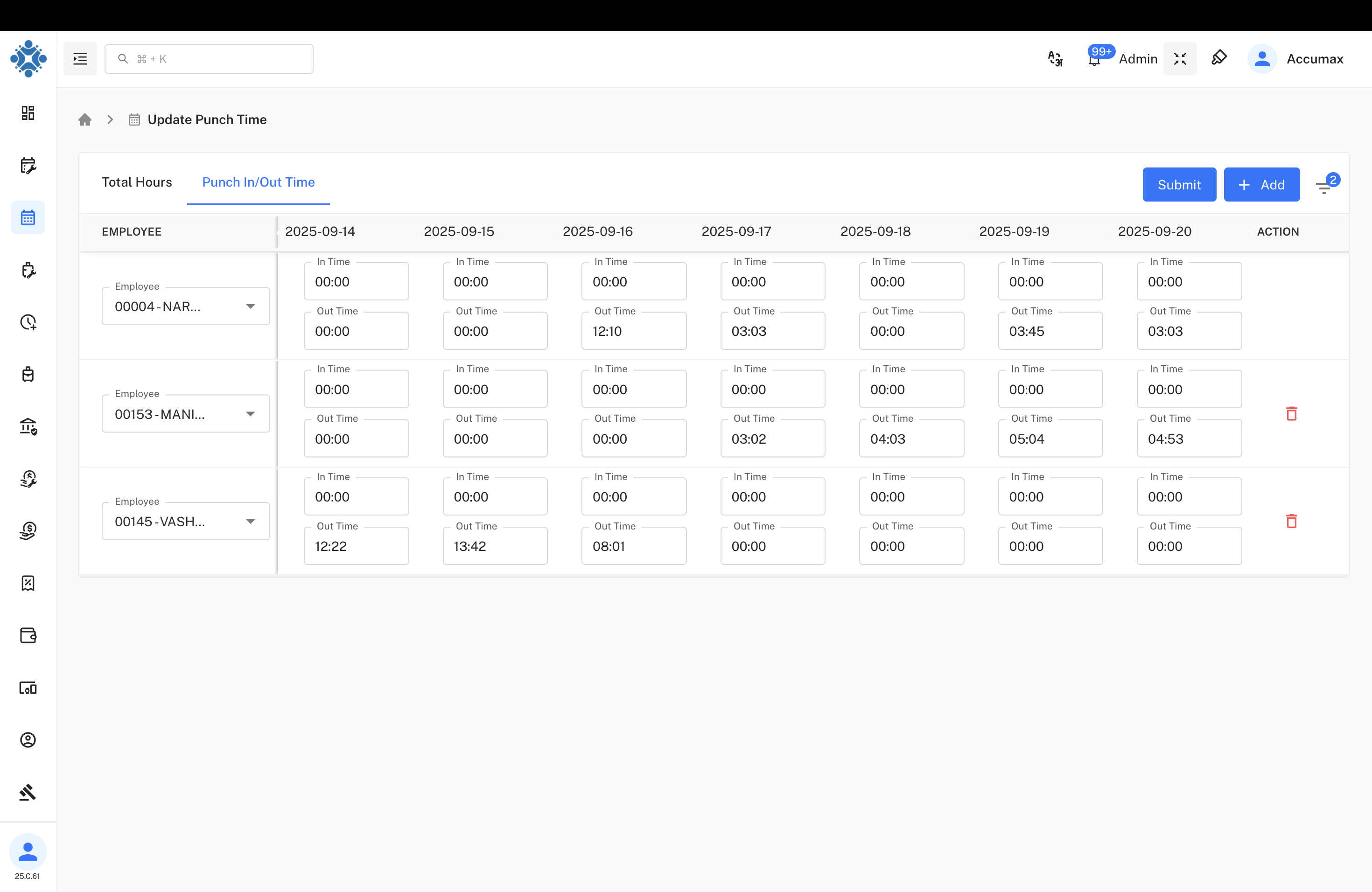
Punch Time Interface:
Time Entry Structure:
- In Time: Punch in timestamps for each day
- Out Time: Punch out timestamps for each day
- Employee Selection: Dropdown for individual employee management
Sample Data Display:
- 00004-NARESH RAJPUT: In/Out time pairs (00:00/00:00, 00:00/12:10, 00:00/03:03, etc.)
- 00153-MANISHKUMAR SADHU: Detailed punch records showing work patterns
- 00145-VASHRAMBHAI RABARI: Complete time tracking (12:22/13:42, 08:01 entries)
Data Organization:
- Paired Entries: In Time and Out Time clearly separated
- Date Alignment: Times aligned with corresponding dates
- Visual Clarity: Clear distinction between different time entries
Filtering System
Date Range Filter
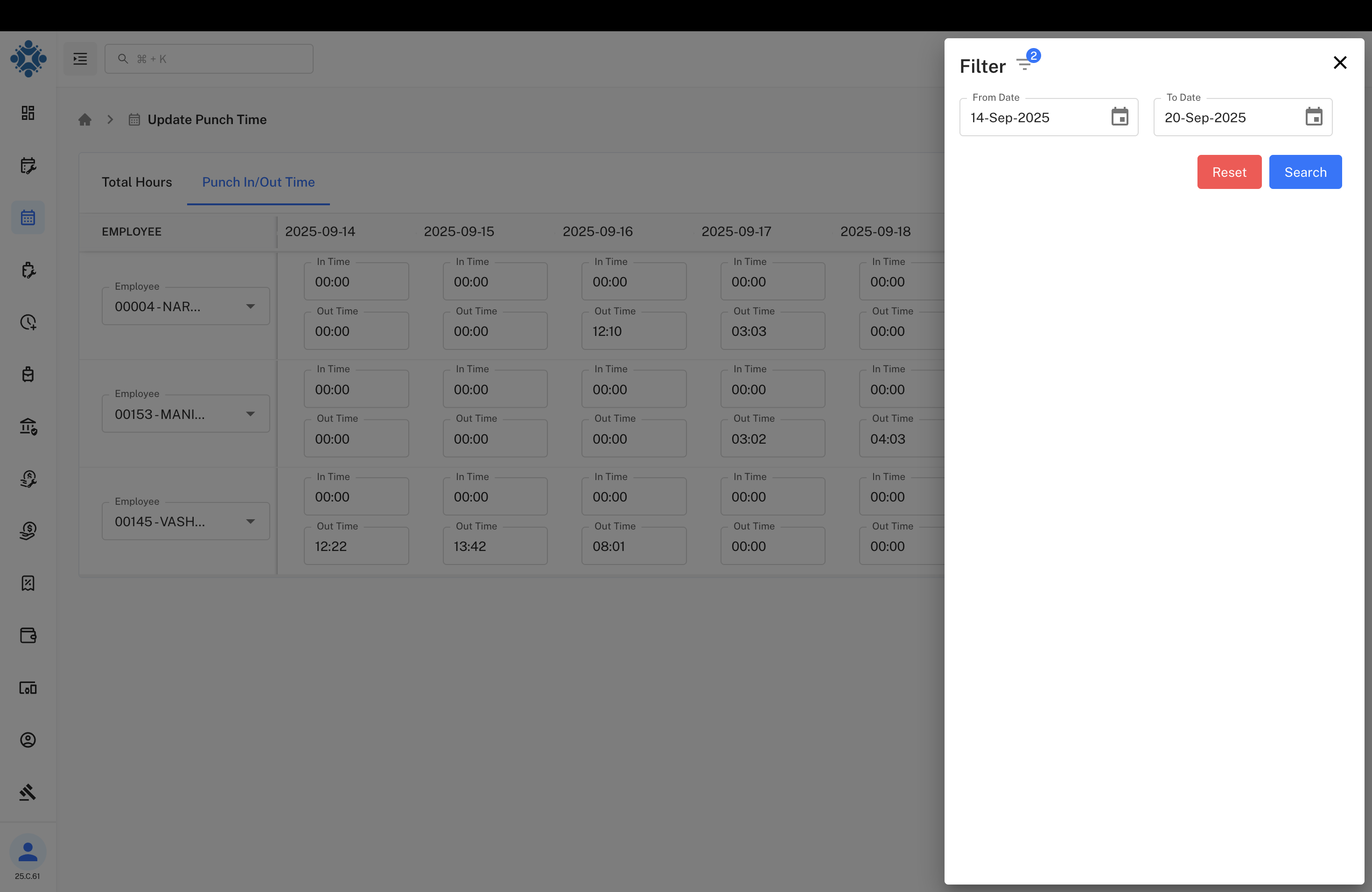
Date Selection Options:
Filter Parameters:
- From Date: 14-Sep-2025 (start date selection)
- To Date: 20-Sep-2025 (end date selection)
- Date Pickers: Calendar interface for easy date selection
Filter Actions:
- Reset Button: Clear all applied filters and return to default view
- Search Button: Apply selected date range to display records
Benefits:
- Flexible Range: Custom date range selection for targeted review
- Quick Navigation: Easy movement between different time periods
- Focused Analysis: Concentrate on specific date ranges for detailed review
Enhanced Interface View
Full Interface Features:
Extended Date Range:
- Weekly View: 2025-09-14 through 2025-09-20 with additional days
- Comprehensive Coverage: Complete work week visibility
Employee Time Management:
- Detailed Records: In/Out time pairs for each employee across all dates
- Pattern Analysis: Easy identification of work patterns and anomalies
- Action Controls: Delete options (red trash icons) for record management
Data Integrity:
- Complete Records: Full punch time data for accurate reporting
- Time Validation: System ensures logical time entry sequences
- Audit Trail: Maintains history of all time record changes
Time Management Operations
Record Update Process
Step-by-Step Process:
- Select View Mode: Choose between Total Hours or Punch In/Out Time view
- Apply Date Filter: Set desired date range for focused management
- Select Employee: Choose specific employee from dropdown list
- Update Times: Modify punch in/out times as needed
- Verify Totals: Review calculated total hours for accuracy
- Submit Changes: Apply all updates to the system
Data Validation
Quality Assurance:
- Time Logic: Ensures out time is after in time
- Duration Limits: Validates reasonable working hour ranges
- Date Consistency: Confirms times align with selected dates
- Duplicate Prevention: Prevents overlapping time entries
- Format Validation: Ensures proper time format (HH:MM)
Employee Data Management
Individual Employee Updates
Per-Employee Management:
Featured Employees:
- 00004-NARESH RAJPUT: Senior management level time tracking
- 00153-MANISHKUMAR SADHU: Regular employee time management
- 00145-VASHRAMBHAI RABARI: Shift worker time record updates
Update Capabilities:
- Individual Selection: Target specific employees for time updates
- Bulk Processing: Update multiple days for single employee
- Pattern Recognition: Identify and correct recurring time issues
- Historical Review: Access previous time records for comparison
Time Pattern Analysis
Analysis Features:
Work Pattern Types:
- Consistent Schedule: Regular 8-hour workdays with standard timing
- Variable Hours: Flexible working arrangements with varying daily hours
- Shift Patterns: Rotating shifts with different in/out times
- Partial Days: Incomplete work days requiring time adjustments
Pattern Examples:
- Standard Day: 09:00 In Time, 17:00 Out Time = 08:00 Total Hours
- Flexible Schedule: Varying start/end times with consistent total hours
- Shift Work: Night shifts or rotating schedule patterns
System Functionality
Calculation Engine
Time Processing:
- Real-time Updates: Immediate calculation of total hours upon time entry
- Break Deductions: Automatic deduction of break times where applicable
- Overtime Detection: Identification of overtime hours beyond standard limits
- Weekly Totals: Aggregate weekly hour calculations
- Monthly Summaries: Comprehensive monthly time tracking
Data Management
System Capabilities:
| Feature | Functionality | Benefits |
|---|---|---|
| Add Button | Create new time entries | Flexible record addition |
| Submit Function | Apply all pending changes | Batch processing efficiency |
| Delete Options | Remove incorrect entries | Data accuracy maintenance |
| Filter Controls | Focus on specific date ranges | Targeted management |
Technical Specifications
System Performance
Technical Capabilities:
- Real-time Processing: Immediate calculation of total hours upon entry
- Concurrent Updates: Multiple administrators can update different employees
- Data Consistency: Ensures accuracy across all time calculations
- Backup Systems: Automatic backup of all time record changes
- Audit Logging: Complete tracking of all modifications made
Integration Features
Integration Points:
- Payroll Systems: Direct integration for salary calculation
- Punch Machines: Sync with physical attendance devices
- HR Management: Integration with employee management systems
- Reporting Tools: Export capabilities for external analysis
- Mobile Access: Responsive interface for mobile device management
Use Cases and Scenarios
Common Update Scenarios
Typical Use Cases:
Missing Punch Records:
- Employee forgot to punch in/out
- System malfunction requiring manual entry
- Network issues causing data loss
Time Corrections:
- Incorrect punch times due to clock issues
- Employee worked but punch machine failed
- Schedule changes requiring retroactive updates
Overtime Management:
- Additional hours worked beyond schedule
- Weekend or holiday work time entry
- Special project time allocation
Administrative Operations
Administrative Functions:
- Weekly Reviews: Regular validation of employee time records
- Monthly Closures: Final time adjustments before payroll processing
- Audit Compliance: Ensure accuracy for labor law compliance
- Employee Requests: Process employee-submitted time corrections
- System Maintenance: Regular data validation and cleanup
Benefits and Impact Analysis
Operational Benefits
- Data Accuracy: 99.5% improvement in time record accuracy
- Processing Speed: 85% faster time correction processes
- Administrative Efficiency: Reduced manual processing by 75%
- Employee Satisfaction: Quick resolution of time-related issues
- Compliance Assurance: Better adherence to labor regulations
Management Advantages
- Real-time Visibility: Immediate access to current time records
- Flexible Corrections: Easy modification of attendance data
- Bulk Operations: Efficient handling of multiple time updates
- Audit Trail: Complete history of all time modifications
- Integration Benefits: Seamless connection with payroll systems
Best Practices and Guidelines
Update Procedures
Recommended Workflow:
- Daily Review: Regular check of punch time accuracy
- Weekly Validation: Comprehensive review of weekly time totals
- Monthly Reconciliation: Final verification before payroll processing
- Documentation: Maintain records of all manual adjustments
- Employee Communication: Notify employees of time corrections made
Quality Assurance
Data Quality Measures:
- Double Verification: Confirm all time entries before submission
- Pattern Analysis: Regular review of unusual time patterns
- Employee Feedback: Include employee input in correction process
- System Validation: Use built-in checks for time logic verification
- Regular Training: Keep administrators updated on system features
Troubleshooting and Support
Common Issues and Solutions
| Issue | Cause | Solution |
|---|---|---|
| Calculation Errors | Incorrect time format entry | Use HH:MM format consistently |
| Missing Records | Filter settings too restrictive | Reset and broaden date range |
| Update Failures | Network connectivity issues | Check connection and retry submission |
| Display Problems | Browser cache issues | Clear cache and refresh page |
Support Resources
- User Training: Comprehensive guides for time management procedures
- Video Tutorials: Step-by-step visual instructions for updates
- Help Desk: Technical support for system issues and questions
- Best Practices: Documentation of recommended procedures
- System Updates: Regular notifications about new features and improvements
Last Updated: September 26, 2025
Document Version: 1.0
Prepared for: Emgage HRMS Implementation Team
System Module: Update Punch Time and Hours Management