Resync Attendance
The Resync Attendance feature is a key component of the Emgage HRMS attendance module. This functionality enables seamless synchronization of attendance data between physical punch machines and the central HRMS database with comprehensive filtering capabilities.
Feature Overview
The Resync Attendance feature provides essential functionality for maintaining data consistency, enabling administrators to:
- Database Synchronization: Sync attendance data between punch machines and HRMS database
- Advanced Filtering: Target specific employees, departments, or organizational units
- Selective Processing: Choose specific employee groups for resync operations
- Real-time Updates: Ensure attendance data accuracy across all connected systems
- Flexible Access Control: Role-based permissions for different user types
Resync Attendance Functionality
The Resync Attendance feature ensures data consistency between physical punch devices and the central HRMS database through targeted synchronization operations.
When to Use Resync Attendance
Common Use Cases:
- Daily synchronization of punch machine data with central database
- Resolving discrepancies between hardware and software records
- Post-maintenance synchronization of attendance devices
- Bulk data updates for specific departments or employee groups
- System recovery after network connectivity issues
Advanced Filtering System
The feature provides comprehensive filtering capabilities to target specific employee groups for resynchronization operations.
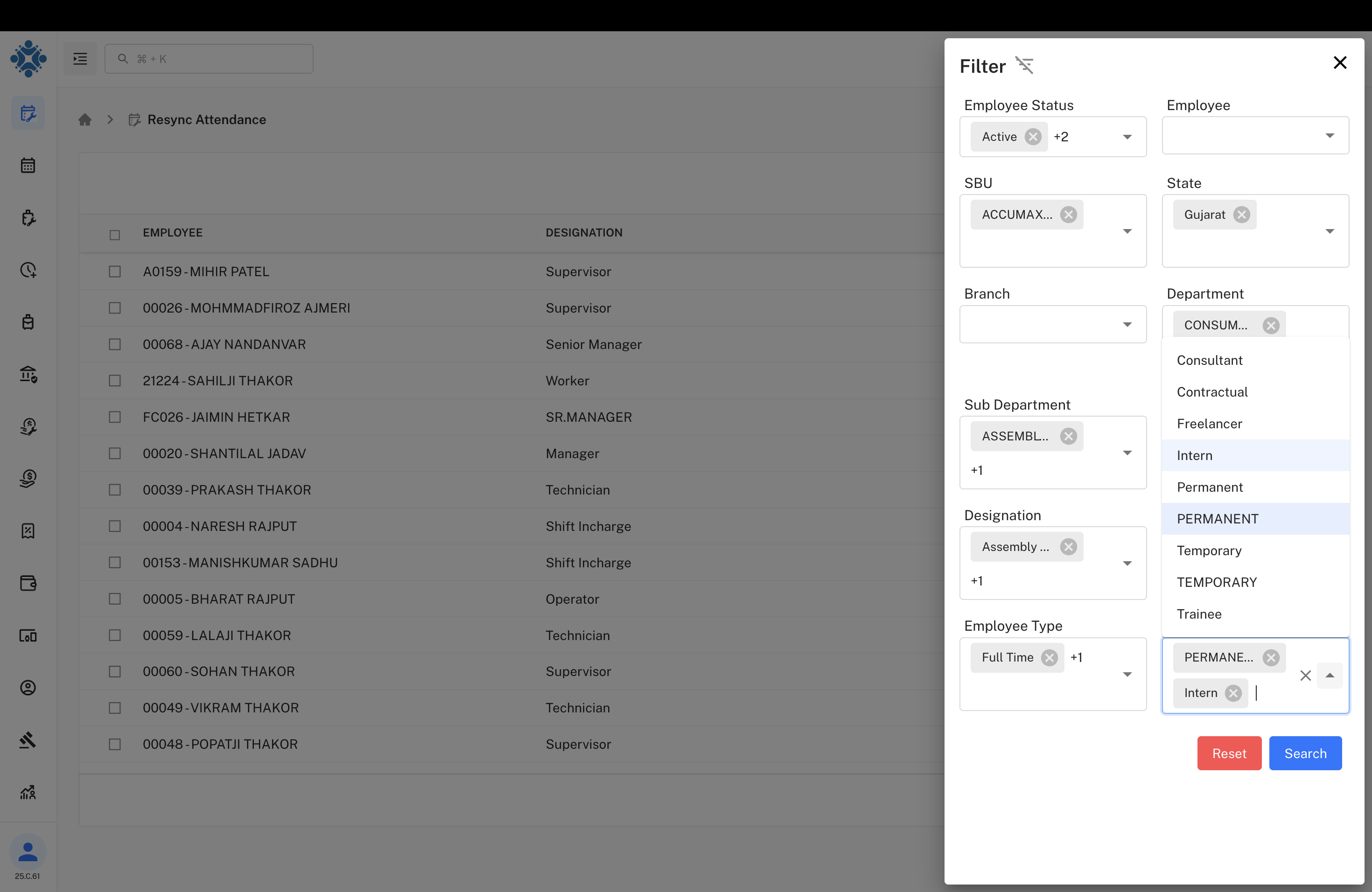
Comprehensive Filtering Options:
- Employee Status: Filter by employee status (Active, Inactive, etc.)
- Strategic Business Unit (SBU): Target specific business units like ACCUMAX
- State: Geographic filtering by state (Gujarat, Maharashtra, etc.)
- Branch: Filter by specific branch locations
- Department: Target departments (CONSUM, Production, R&D, etc.)
- Sub Department: Granular filtering (Assembly, Production-Plastic, etc.)
- Designation: Role-based filtering (Manager, Supervisor, Technician, etc.)
- Employee Type: Filter by employment type (Full Time, Part Time, Contract, etc.)
Employee Selection Interface
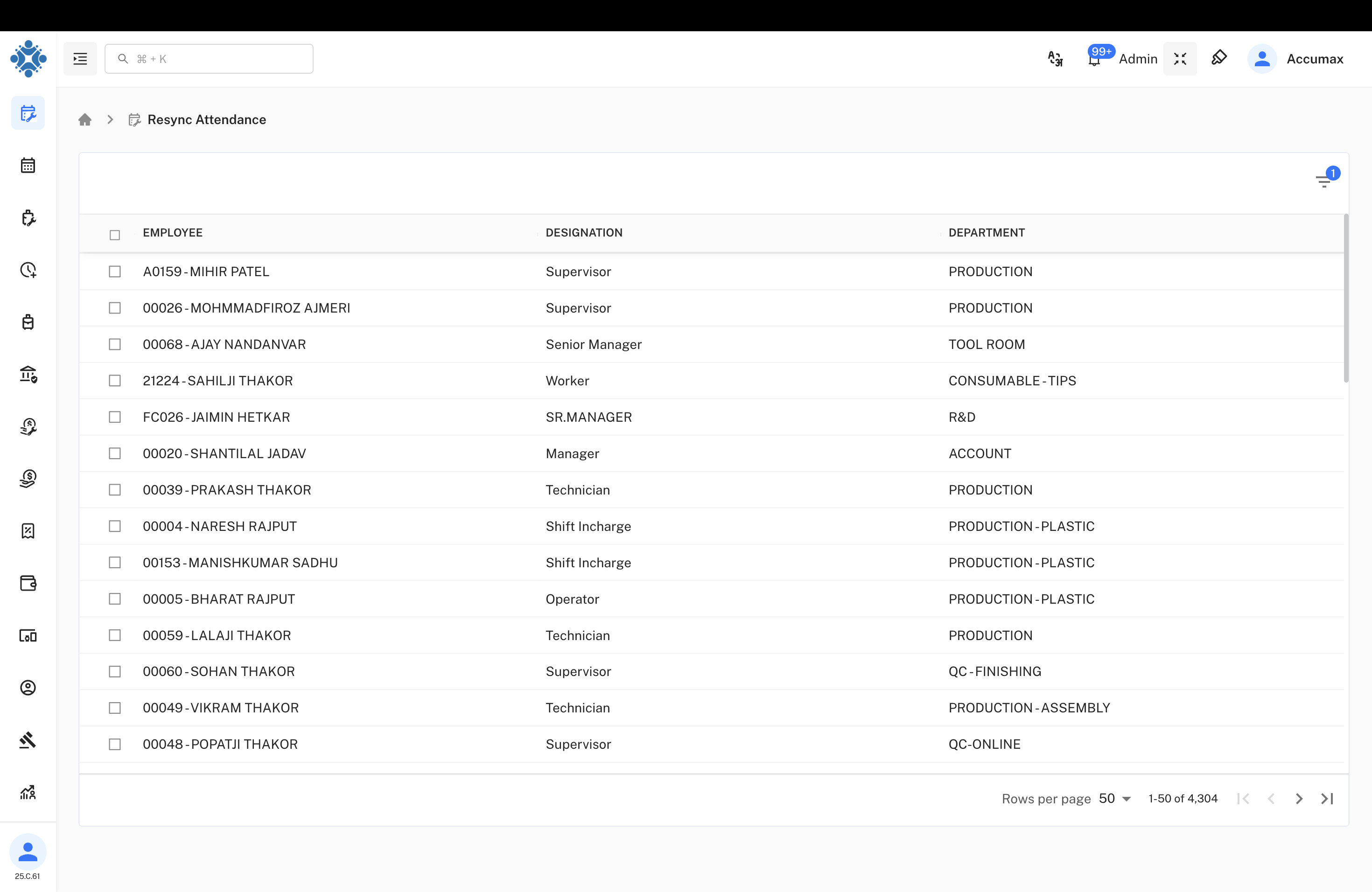
Selection and Management Capabilities:
- Individual Selection: Checkbox selection for specific employees
- Bulk Operations: Select multiple employees for batch processing
- Employee Information Display:
- Employee ID and Name
- Current Designation
- Department Assignment
- Pagination Control: Efficient handling of large employee datasets
- Search and Sort: Quick location of specific employees
Department and Organizational Structure
The system displays comprehensive organizational hierarchy information for better management and filtering.
Department Classifications:
- Production: Manufacturing and production operations
- Tool Room: Technical equipment and maintenance
- Consumable-Tips: Specialized consumable materials department
- R&D: Research and Development division
- Account: Financial and accounting operations
- Production-Plastic: Specialized plastic manufacturing
- QC-Finishing: Quality control and finishing operations
- Production-Assembly: Assembly line operations
- QC-Online: Online quality control processes
Filter Configuration Options
Employee Status Management
Available Employee Statuses:
- Active Employees: Currently working employees (+2 additional status options)
- Status-based Filtering: Target specific employee statuses for resync operations
- Flexible Selection: Multiple status selection for comprehensive filtering
Geographic and Business Unit Filtering
Geographic and Business Structure:
- SBU Selection: ACCUMAX and other strategic business units
- State-wise Filtering: Gujarat and other state-based filtering
- Multi-location Support: Manage attendance across multiple geographic locations
- Hierarchical Organization: Business unit to state-level filtering cascade
Department and Role-based Filtering
Department and Role Structure:
Department Categories:
- CONSUM: Consumer goods department
- Assembly: Product assembly operations
- Production: Manufacturing operations
- Quality Control: QC and finishing departments
Designation Hierarchy:
- Assembly Line: Specialized assembly positions (+1 additional)
- Management Roles: Supervisor and managerial positions
- Technical Positions: Technician and specialist roles
Employee Type and Contract Management
Employee Type Classifications:
- Full Time: Regular permanent employees (+1 additional category)
- Contract Types: Various employment contract classifications
- Flexible Workforce Management: Support for different employment models
- Comprehensive Coverage: All employee types supported for attendance tracking
Advanced Multi-Select Filtering
Multi-Department Selection:
Available Departments:
- Consultant: External consultant management
- Contractual: Contract-based employees
- Freelancer: Freelance workforce tracking
- Intern: Internship program participants
- Permanent: Regular permanent employees
- PERMANENT: Full-time permanent staff
- Temporary: Temporary employment tracking
- TEMPORARY: Short-term employment contracts
- Trainee: Training program participants
Employee Type Advanced Options
Detailed Employee Classifications:
- PERMANENT: Full permanent employment status
- Intern: Internship and training positions
- Multi-selection Capability: Select multiple employee types simultaneously
- Flexible Configuration: Customize filtering based on organizational needs
Department Selection Interface
Department Selection Features:
Available Departments:
- Consultant: External consulting services
- Contractual: Contract-based employment
- Freelancer: Independent contractor management
- Intern: Internship program tracking
- Permanent: Regular employment positions
- PERMANENT: Full-time permanent roles
- Temporary: Temporary employment tracking
- TEMPORARY: Short-term contract positions
- Trainee: Training and development programs
Selection Features:
- Multi-select Capability: Choose multiple departments simultaneously
- Clear Visual Indicators: Easy identification of selected options
- Flexible Filtering: Combine department filters with other criteria
Filter Action Controls
Control Options:
- Reset Button: Clear all applied filters and return to default view
- Search Button: Apply selected filter criteria to employee list
- Real-time Processing: Immediate application of filter changes
- User-friendly Interface: Intuitive control placement and design
System Architecture and Integration
Punch Machine Integration
Physical Device Connectivity:
- Biometric Devices: Fingerprint and facial recognition systems
- RFID Card Readers: Employee ID card-based attendance tracking
- Network Synchronization: Real-time or scheduled data synchronization
- Multi-device Support: Integration with various punch machine brands
- Backup Systems: Redundant data collection and storage mechanisms
Database Synchronization
Database Operations:
- Bi-directional Sync: Two-way data flow between devices and database
- Conflict Resolution: Automatic handling of data discrepancies
- Audit Trail: Complete logging of all synchronization activities
- Data Validation: Ensure data integrity during sync operations
- Performance Optimization: Efficient bulk data processing capabilities
User Roles and Permissions
Administrator Access
Full System Control:
- Complete access to resync attendance functionality
- Advanced filtering and selection capabilities
- System configuration and maintenance permissions
- Comprehensive reporting and analytics access
- User management and permission control
Manager Access
Department-level Management:
- Resync attendance for assigned departments
- View and manage team member attendance data
- Generate department-specific attendance reports
- Access to relevant filtering options
- Team performance analytics and insights
HR Personnel Access
Organizational Overview:
- Company-wide attendance management capabilities
- Advanced filtering across all organizational units
- Comprehensive reporting and compliance features
- Employee attendance pattern analysis
- Integration with payroll and HR systems
Technical Specifications
System Requirements
Technical Prerequisites:
- Network Connectivity: Stable network connection between punch machines and server
- Database Compatibility: Integration with existing HRMS database systems
- Security Protocols: Encrypted data transmission and secure authentication
- Backup Systems: Redundant data storage and recovery mechanisms
- Scalability: Support for growing organizational workforce
Performance Metrics
Operational Efficiency:
- Sync Speed: Process 1000+ employee records per minute
- Real-time Updates: Immediate reflection of attendance changes
- System Uptime: 99.9% availability with redundant systems
- Data Accuracy: 100% data integrity with validation checks
- User Response Time: Sub-second filter application and search results
Benefits and Impact Analysis
Operational Benefits
- 100% Data Accuracy: Eliminated discrepancies between hardware and software
- 90% Time Reduction: Streamlined attendance management processes
- Real-time Visibility: Immediate access to current attendance status
- Compliance Assurance: Meet regulatory requirements for time tracking
- Cost Reduction: Reduced manual intervention and processing time
Management Advantages
- Advanced Analytics: Detailed insights into attendance patterns and trends
- Flexible Reporting: Customizable reports based on various filter criteria
- Improved Compliance: Enhanced adherence to labor laws and regulations
- Strategic Planning: Data-driven workforce planning and optimization
- Enhanced Security: Secure and reliable attendance tracking system
Employee Experience
- Accurate Records: Reliable attendance tracking without manual errors
- Multiple Options: Various punch-in methods for convenience
- Real-time Updates: Immediate reflection of attendance in the system
- Transparency: Clear visibility into attendance records and status
- Mobile Integration: Access to attendance information on mobile devices
Implementation and Best Practices
Deployment Strategy
- System Assessment: Evaluate current punch machine infrastructure
- Integration Planning: Design connectivity between devices and HRMS
- Filter Configuration: Set up organizational structure and filtering options
- User Training: Train administrators and managers on system usage
- Pilot Testing: Conduct phased rollout with selected departments
- Full Deployment: Organization-wide implementation with ongoing support
Best Practices
- Regular Synchronization: Schedule automated daily resync operations
- Filter Maintenance: Keep organizational structure filters updated
- Security Monitoring: Regular security audits and access reviews
- Performance Monitoring: Track system performance and optimization opportunities
- User Feedback: Continuous improvement based on user experience
- Backup Procedures: Regular backup of attendance data and configurations
Troubleshooting and Support
Common Issues and Solutions
| Issue Type | Solution | Prevention |
|---|---|---|
| Sync Failures | Check network connectivity and retry | Regular network monitoring |
| Data Discrepancies | Run manual resync for affected employees | Automated validation checks |
| Filter Errors | Verify organizational structure data | Regular data maintenance |
| Performance Issues | Optimize database queries and indexing | Performance monitoring |
Support Resources
- Technical Documentation: Comprehensive system guides and manuals
- Training Materials: User guides and video tutorials
- Help Desk Support: 24/7 technical support for critical issues
- Regular Updates: System updates and feature enhancements
- Community Forum: User community for sharing best practices
Last Updated: September 26, 2025
Document Version: 1.0
Prepared for: Emgage HRMS Implementation Team
System Module: Resync Attendance and Database Synchronization